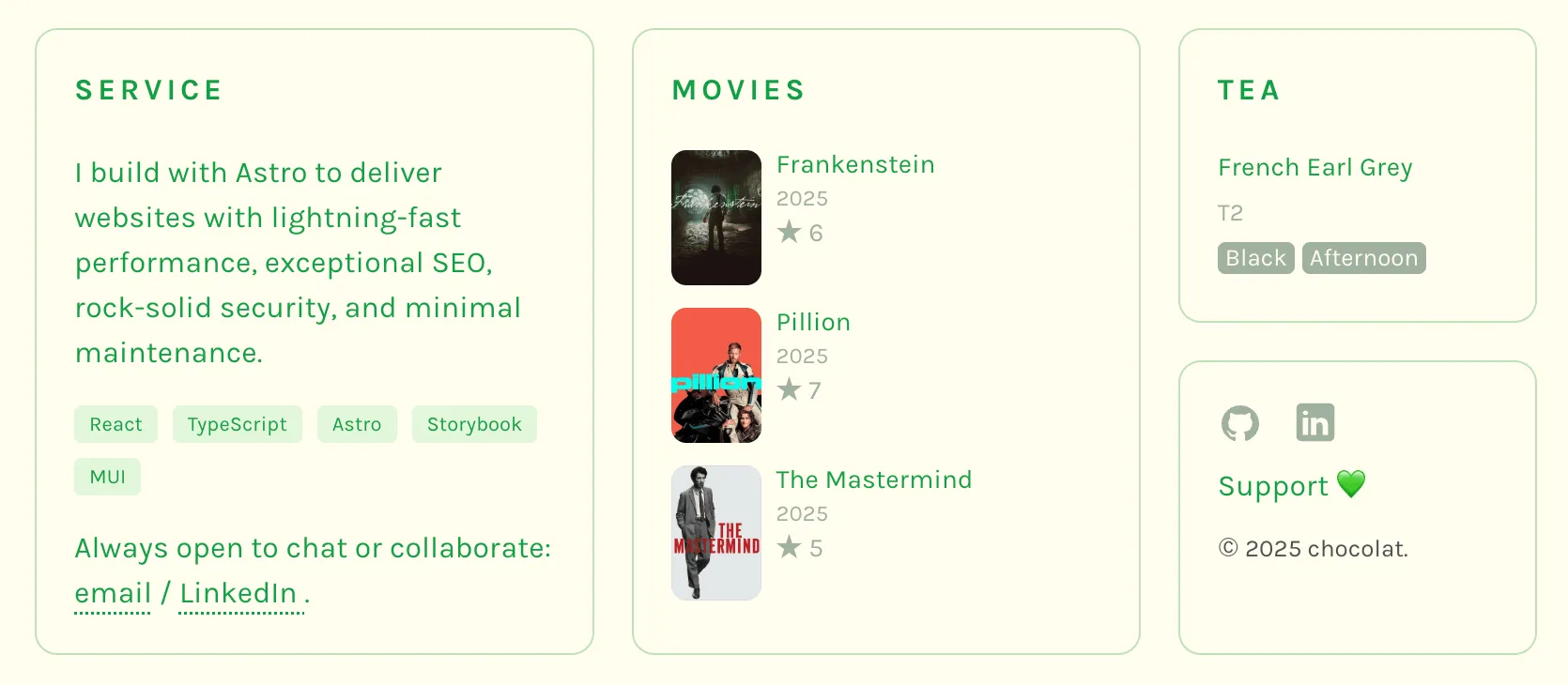
I started using “Letterboxd” in 2023 (I’m still keeping track of my watched movies with a spreadsheet, though). Since “Letterboxd” provides an official RSS, I thought, why not use it. My goal is to display my latest watched movies on my personal website using the Letterboxd RSS.
How to Access RSS feed
You can access RSS feed by adding rss to your profile URL.
Here’s my RSS feed:
https://letterboxd.com/yuri232/rss/This RSS feed provides limited data, including 50 latest movies you watched and 3 lists.
How to Display
1. Install an RSS Parser
You need to convert XML to JSON. I chose fast-xml-parser library to parse XML. It’s fast and lightweight.
npm i fast-xml-parser2. Fetching and Parsing
Fetching the RSS feed using the fetch() method and parsing it with the library you installed.
// fetch rss
const response = await fetch("https://letterboxd.com/<YOUR_LETTERBOXD_ID>/rss/");
const xmlText = await response.text();

// parse rss feed to JSON
const parser = new XMLParser();
const result = parser.parse(xmlText);

// access latest movies
const items = result.rss?.channel?.item;
Each item looks like this:
{
  title: 'Sinners, 2025 - ★★½',
  link: 'https://letterboxd.com/yuri232/film/sinners-2025/',
  guid: [Object],
  pubDate: 'Fri, 9 May 2025 09:27:02 +1200',
  'letterboxd:watchedDate': '2025-05-08',
  'letterboxd:rewatch': 'No',
  'letterboxd:filmTitle': 'Sinners',
  'letterboxd:filmYear': 2025,
  'letterboxd:memberRating': 2.5,
  'tmdb:movieId': 1233413,
  description: ' <p><img src="https://a.ltrbxd.com/resized/film-poster/1/1/1/6/6/0/0/1116600-sinners-2025-0-600-0-900-crop.jpg?v=5996b7d555"/></p> <p>Watched on Thursday May 8, 2025.</p> ',
  'dc:creator': 'yuri232'
}
3. Displaying the Data
Select ths items you want and format the data. For example, to use the first 3 items, you can use the slice() method.
items.slice(0, 3)You can access properties by their keys.
item["letterboxd:filmTitle"] // => SinnersHere’s my code to extract basic information like title, year, and rating.
const movies: Movie[] = items.slice(0, 3).map((item: any) => {
  return {
    title: item["letterboxd:filmTitle"],
    year: item["letterboxd:filmYear"],
    rating: Number(item["letterboxd:memberRating"]),
  };
});
This returns an array like this:
movies: [
  {
    name: 'The Mastermind',
    year: 2025,
    rating: 2.5,
  },
  {
    name: 'Frankenstein',
    year: 2025,
    rating: 3,
  },
  {
    name: 'Pillion',
    year: 2025,
    rating: 3.5,
  },
]
4. Displaying Posters
You can find the poster image in description.
description: ' <p><img src="https://a.ltrbxd.com/resized/film-poster/9/5/8/1/0/0/958100-frankenstein-2025-0-600-0-900-crop.jpg?v=49a1ca2305"/></p> <p>Watched on Monday November 10, 2025.</p> ',I created a function to extract the poster path:
function getPosterPath(text: string): string {
  const parser = new XMLParser({
    ignoreAttributes: false,
  });
  const doc = parser.parse(text);
  if (doc.p) {
    const firstP = Array.isArray(doc.p) ? doc.p[0] : doc.p;
    if (firstP.img && firstP.img["@_src"]) {
      return firstP.img["@_src"];
    }
  }

  return "";
}
5. Sort by Watched Date
By default, the movie list is sorted by the last update date.
If you want to display movies by the last watched date, you need to sort the items.
// sort the items
const sortedItems = items.toSorted(
  (a: any, b: any) =>
    Date.parse(b["letterboxd:watchedDate"]) -
    Date.parse(a["letterboxd:watchedDate"])
);

// replace items with sortedItems
const movies: Movie[] = sortedItems.slice(0, limit).map((item: any) => {
  ...
});
Conclusion
This method allows you to display your latest watched movies on your website.
Here’s the sample: